AI Agents for Business: Marketing, Operations and CRM
Learn how Grok Bot, Muse, OpenClaw, Dot, and Hermes fit marketing, finance, supply chain, and HR workflows with Salesforce, HighLevel, and BizTRAQ.
88 Labs AI
Editorial Team
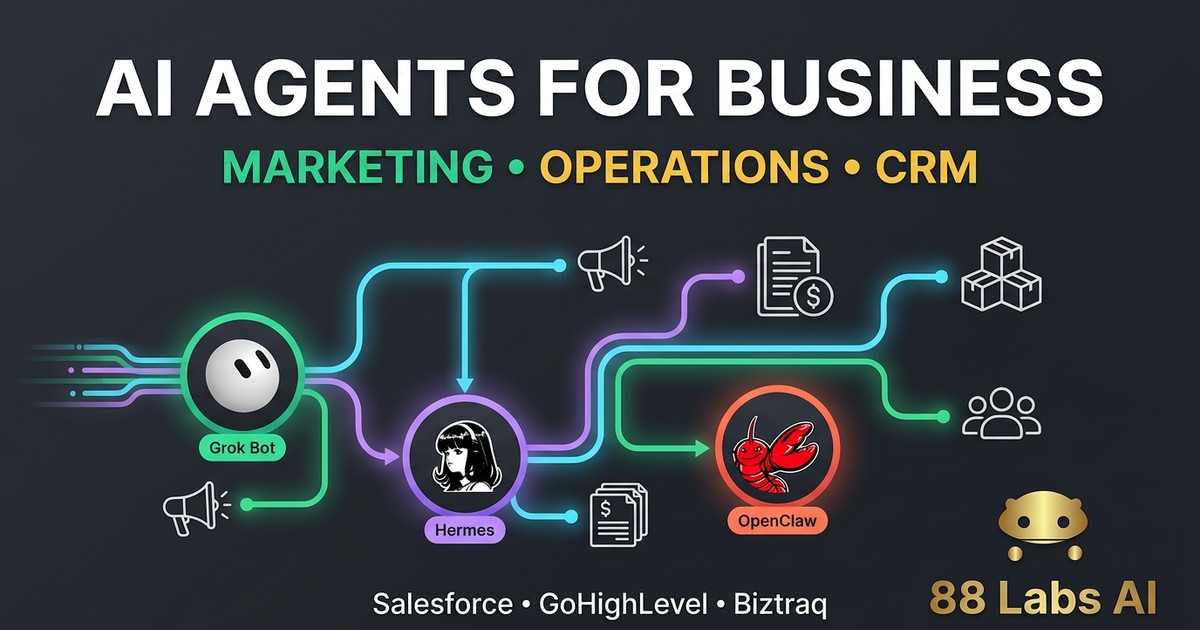
AI agents for business work best when they have a defined job, access to the right records, and clear limits on what they can change. In marketing, that might mean preparing a lead brief and drafting a follow-up. In finance, it might mean identifying unused software seats. In supply chain or HR, it could mean flagging exceptions and coordinating the next step—not approving purchases or employment decisions on their own.
The practical question is how to connect an existing agent to the systems you already use. This guide covers Grok Bot, Meta Muse, OpenClaw, Dot, and Hermes Agent alongside Salesforce, GoHighLevel, and BizTRAQ. It separates officially documented connections, custom API or MCP configurations, and connections that remain unverified.
Quick answer: xAI documents a Salesforce connector for Grok, subject to availability in the specific product surface. HighLevel documents an official Muse connection. OpenClaw and Hermes document MCP clients that can be configured with compatible CRM servers. Public BizTRAQ material reviewed for this guide does not establish a public API or MCP connection for these agents.
What AI agents can do across your business
A useful agent workflow combines an objective, a reliable source of information, permitted actions, an approval checkpoint, and an observable result. The following are implementation examples—not claims that every named agent includes a ready-made solution for every department.
Marketing and sales: turn CRM context into useful action
Marketing agents can help prepare account research, summarize previous conversations, draft campaign assets, identify incomplete CRM fields, and create follow-up tasks. The important improvement is context: a draft should reflect the actual lead, stage, and consent status instead of treating everyone as a new prospect.
A practical workflow starts when an eligible lead enters the CRM. An integration retrieves approved contact and opportunity fields. The agent prepares a brief, proposes the next action, and drafts a message. A salesperson reviews it before an authorized workflow sends it and records the activity.
Keep consent and unsubscribe rules outside the model’s discretion. Do not let an agent invent customer facts, bypass suppression lists, or send bulk outreach simply because it can access a messaging tool. Measure reply quality, qualified opportunities, time to follow up, and the amount of correction required—not just content volume.
Finance: find exceptions before authorizing money movement
Finance agents can assist with invoice review, missing-document checks, spend summaries, renewal calendars, and variance explanations when connected to appropriate records. Start with read-only analysis and proposed actions, not unrestricted payment authority.
There is a documented example: xAI’s Haggle Bot procurement report describes combining vendor spend, contracts, and usage data to identify more than $100,000 in direct savings. That is xAI’s reported result, not a guaranteed outcome for other businesses.
A smaller company could begin with a subscription review: list the current vendors, identify the renewal owner, compare purchased seats with approved usage data, and prepare findings for review. An authorized person decides whether to cancel, downgrade, or negotiate.
For accounting workflows, retain the accounting or ERP system as the source of truth. A CRM note is not an accounting entry. Payments, bank-detail changes, tax filings, and binding agreements should retain explicit authorization and reconciliation.
Supply chain: monitor changes and prepare exception reports
Supply-chain workflows need more than a CRM connection. They usually require approved inventory, procurement, order, and supplier records from the operational system.
An example is a daily exception report: retrieve open orders and confirmed supplier dates, compare them with required delivery dates, identify discrepancies, and prepare a supplier follow-up draft. A planner validates the interpretation before commitments or purchase orders change.
Do not treat an agent’s estimate as a confirmed delivery date. Distinguish stock on hand from available-to-promise quantities, and include existing reservations. Forecasting, order placement, and production planning require their own validated business logic; access to an agent alone does not establish those capabilities.
HR: coordinate administrative work without delegating employment decisions
HR agents can help locate approved policy documents, prepare onboarding checklists, summarize unanswered employee questions, and coordinate equipment or training tasks. These are often better first projects than automated candidate ranking or disciplinary recommendations.
Limit access to the necessary employee fields. Payroll, medical information, identity documents, and performance records should not be casually copied into a broadly connected agent’s memory or shared workspace.
Keep hiring, compensation, termination, and sensitive employee decisions under accountable human review. Use an approved HR system for authoritative records, with a clear retention policy and an audit trail for changes.
Which existing AI agent fits the job?
Grok Bot: approachable business workflows with explicit boundaries
Grok Bot uses a persistent cloud computer with browser, terminal, and files. Its documentation describes using connectors where available and computer use otherwise.
This can fit research, routine coordination, and repeatable business work. xAI’s Grok connector documentation lists Salesforce, but a connector documented for Grok should not be assumed available in every Grok Bot account or plan. Confirm it in the particular product surface before promising a deployment.
Grok Bot’s computer and apps guide also explains that Bots share a cloud computer. Separate Bot names are not a security boundary for browser cookies, files, or command-line credentials. Avoid mixing unrelated departments or customers where that shared access would be inappropriate.
Meta Muse: accessible content work and a documented HighLevel connection
This guide uses Muse to mean Meta Muse, not another product sharing the name. Muse can be considered for content-oriented work, but the most concrete CRM connection here is HighLevel’s official Muse integration guide.
HighLevel says its MCP is available as an official app in Muse. OAuth authorization lets the user select CRM sub-accounts and review requested scopes. The accessible operations depend on that authorization.
That creates a practical route for approved CRM work around contacts, conversations, calendars, and opportunities. It does not grant unlimited access, and it is not proof of a Muse–Salesforce or Muse–BizTRAQ connector.
OpenClaw: configurable tool access for technically managed deployments
OpenClaw’s MCP documentation describes an outbound client that can connect to third-party MCP servers. That provides a protocol-based route to a compatible CRM server, rather than proving a packaged connector for every CRM.
Its browser security guidance is especially important: attaching an existing signed-in browser can let the agent act through that session and reach accounts available there. Use an isolated profile and narrow access wherever practical.
OpenClaw suits teams willing to manage configuration, policies, credentials, and monitoring. A browser successfully opening the CRM is not equivalent to a supported, auditable API integration.
Hermes Agent: greater configuration control, with more technical responsibility
Hermes Agent supports user-managed deployments and MCP tool servers, including local and remote configurations. Its tool filtering can help expose only the actions a particular agent needs.
For a business integration, an administrator or developer configures the compatible server, authentication, allowed tools, and execution environment. The agent can then use those tools within the configured permissions.
Our perspective remains that Hermes requires more technical knowledge and setup discipline than a managed cloud option. It can suit teams that value control over their deployment and tool surface, but configuration responsibility does not disappear simply because the software is open source.
Dot: identify the product before choosing the integration
Dot is not a unique product name. OpenAI’s ChatGPT dots and GetDot’s AI data analyst are different offerings.
If you mean ChatGPT dot, OpenAI describes an agent with connected tools and a cloud computer. The sources reviewed for this guide do not establish dot-specific native connections to Salesforce, HighLevel, or BizTRAQ. Do not assume that every ChatGPT connector is also available to a dot.
If you mean GetDot, its MCP documentation provides a separate integration surface for its data-analysis product. That is not evidence that it can automatically write CRM records or perform HR and finance actions.
Before procurement or implementation, record the exact vendor, product URL, account eligibility, supported interfaces, and required permissions. A name match is not a compatibility check.
How to integrate AI agents with Salesforce
There are three distinct routes to assess: a supported product connector, a Salesforce-hosted MCP server, or a custom REST API integration.
Route 1: use a documented connector when available
For Grok, check xAI’s Salesforce connector documentation and the account’s current connection options. Have the Salesforce administrator approve the intended user and accessible objects. Begin by reading a small set of non-sensitive records and preparing a summary.
Only then test a narrow write action, such as adding an approved task to a test record. Confirm the result in Salesforce itself. Do not interpret a successful sign-in as proof that all required CRM actions are supported.
Route 2: configure a compatible Salesforce MCP server
Salesforce documents hosted MCP servers and client connection setup. OpenClaw and Hermes document MCP client support, making this a configuration path to evaluate.
A practical sequence is:
1. Ask the Salesforce administrator which hosted MCP server is available and enabled for the required task.
2. Configure the supported OAuth client using Salesforce’s documented External Client App process.
3. Check that the agent supports the server’s authentication and transport requirements; MCP support alone does not guarantee plug-and-play compatibility.
4. Grant only the necessary object, field, sharing, scope, and tool permissions.
5. Run a read-only task in a test environment, then test a narrowly authorized write and verify it in the CRM.
Server access, licensing, and user permissions matter. This is a documented-protocol setup, not a claim that OpenClaw or Hermes includes a native Salesforce connector.
Route 3: build a narrow REST integration
Salesforce’s REST authorization documentation describes authorized API access. A custom service can expose a small number of business actions, such as retrieving an account brief or creating an approved follow-up task.
Define field mapping and update ownership before writing records. Use stable IDs, validate inputs, protect credentials on the server, and record who authorized each action.
For event-driven workflows, Salesforce Pub/Sub API supports event subscriptions. Platform Events and Change Data Capture are streaming patterns, not interchangeable with a simple outbound webhook.
How to integrate AI agents with GoHighLevel
GoHighLevel is also documented as HighLevel, with LeadConnector infrastructure appearing in its API and MCP material. Use the current Marketplace API documentation, not an old tutorial built around unsupported V1 APIs.
Connect Muse through the official HighLevel app
Follow HighLevel’s Muse setup instructions: choose the HighLevel app in Muse’s supported connection flow, complete OAuth, select the intended sub-account or sub-accounts, and review the requested scopes before approving.
Then test a contained task, such as summarizing a selected opportunity or preparing a follow-up draft. Review the available actions and the information returned before enabling record changes. Keep each agency client’s authorization and data separate.
Configure Hermes or OpenClaw against a compatible MCP connection
HighLevel publishes MCP documentation. Compare its documented authentication and transport requirements with the chosen agent’s MCP client configuration.
Do not reuse a Muse-specific endpoint for an unrelated client without documentation supporting that use. Likewise, having an MCP client does not by itself prove that it can complete a provider’s OAuth flow.
Where supported, configure only the required CRM tools and scopes. If the direct client route is incompatible, evaluate a narrow authorized API adapter instead of improvising unsupported authentication.
Use events and APIs for controlled marketing workflows
HighLevel documents OAuth and a Custom Webhook workflow action. These can support an integration pattern in which a CRM event triggers approved agent work and an authorized service writes back the reviewed result.
For example: an eligible lead enters a pipeline, the workflow sends its stable record ID to the integration, the integration retrieves allowed fields, the agent drafts a brief, and an approved task is written back. Prevent repeated delivery from creating duplicate tasks.
HighLevel’s marketing and sales tools do not make it a universal finance, payroll, or inventory system. Connect the appropriate operational source for those departments.
How to approach BizTRAQ integration
BizTRAQ describes configurable modules spanning CRM and sales, procurement, finance, HR and payroll, and operations. That breadth makes it relevant to an internal-operations discussion, but module coverage is not proof of a public integration interface.
The public documentation page reviewed for this article does not establish a public API, OAuth flow, MCP server, or named connector for Grok Bot, Muse, OpenClaw, Dot, or Hermes.
Do not promise a working connection until BizTRAQ or its implementation partner confirms the supported route. Ask for:
If an approved API is available, a narrow adapter may be feasible. If only authorized exports are available, begin with an analysis workflow that cannot modify the live system. Browser automation is a separate fallback to assess with the vendor—not evidence of an official integration.
A practical rollout: one workflow before five agents
Step 1: choose the outcome and its owner
Pick a contained job: draft follow-ups for eligible leads, prepare a renewal review, flag late orders, or coordinate onboarding tasks. Name the person responsible for reviewing results and authorizing changes.
Step 2: define the source of truth
Keep customer and opportunity records in the CRM, accounting records in the finance system, inventory in the operational system, and employee records in the HR system. Document the stable IDs and fields that link them.
Step 3: limit the agent’s tools and data
Grant the minimum records and actions required. Keep credentials out of prompts and chat history. Review whether agent memory, browser sessions, or connected storage could expose one department’s information to another.
Step 4: test failures as well as success
Try a missing field, an expired connection, a duplicate event, and a rejected action. Confirm the system stops safely and reports the problem instead of silently creating incorrect records or repeating an external send.
Step 5: verify the result in the destination system
Read back the created task, updated field, or completed report. Keep an audit record of inputs, proposed actions, approvals, and results. Build a reconciliation process for events that arrive late or fail.
Step 6: expand only when the workflow is trustworthy
Compare accuracy, review effort, completed work, and net value with the previous process. Increase access gradually. Do not deploy five overlapping agents simply because five products are available.
The 88 Labs AI perspective
Grok Bot is approachable for setting up business routines. Muse can be easy to use for personal and content work, and its documented HighLevel connection deserves attention for CRM workflows. Hermes offers a more configurable path but requires greater technical knowledge and ongoing management. OpenClaw also needs deliberate security and tool configuration.
The best choice depends on the job, not the popularity of the agent. A marketing assistant should not need payroll access. A procurement assistant should not be able to approve payments just because it can read invoices.
Start with a useful, boring workflow and prove that it works. Then expand the integration, not just the agent’s authority.
See Your Free Demo to explore a workflow for your existing systems, or visit our Grok Bot setup and booking page. Continue with our Grok Bot procurement guide, four-agent comparison, and Hermes versus OpenClaw guide.
FAQ
Can AI agents handle marketing and internal operations?
They can assist with defined tasks when given authorized access to the right systems. Marketing drafts, spend reviews, supply-chain exception reports, and onboarding coordination are practical examples. Payments, contracts, and employment decisions should retain accountable human approval.
Can Grok Bot integrate with Salesforce?
xAI documents a Salesforce connector for Grok. Confirm that it is available in the specific Grok Bot account and product surface, and verify the required actions and Salesforce permissions before promising a deployment.
Can Muse connect to GoHighLevel?
Yes. HighLevel documents an official Muse app connection using OAuth and MCP. Users select the intended CRM sub-accounts and review requested scopes; accessible operations depend on that authorization.
Can Hermes and OpenClaw connect to CRM systems?
Both document MCP client support. They can be evaluated against compatible Salesforce or HighLevel MCP servers, subject to authentication, transport, permissions, and account availability. This is configuration work, not proof of a built-in connector for every CRM.
Does BizTRAQ have a verified connector for these agents?
The public sources reviewed do not establish a named connector, public API, or MCP server for these agent integrations. Confirm the supported interface and licensing directly with BizTRAQ or its implementation partner before designing the connection.
Which Dot product does this guide mean?
Dot can refer to different products, including OpenAI’s ChatGPT dot and GetDot’s AI data analyst. This guide discusses both separately. Their capabilities and integration surfaces must not be treated as interchangeable.
Is MCP the same as a native integration?
No. MCP is a protocol for exposing tools to compatible clients. A native integration is a product-supported connection. MCP compatibility still requires working authentication, permissions, supported tools, and configuration.
Should an AI agent replace our CRM or ERP?
For the workflows described here, keep the CRM, finance, inventory, and HR systems as authoritative records. Use agents to help research, coordinate, draft, and perform narrowly approved actions around those systems.
Sources and scope
Reviewed October 17, 2026. Workflow examples are proposed implementation patterns, not claims that every agent–CRM combination has been tested or certified. Product availability, permissions, and licensing can change. The cover is an editorial illustration, not a certification of the connections shown.
Ready to see this in action?
Get a free, personalized demo of an AI agent built for YOUR business.
Get Your Free Demo